Grok Automation
Bulk Video Generator for Grok AI
Queue all your prompts, click start, sit back. Grok Automation sends each prompt to grok.com, generates your videos one by one, and auto-downloads every single one - completely hands-free.
What is Grok Automation?
Grok Automation is a free Chrome browser extension designed specifically for Grok AI (grok.com by xAI). It transforms how content creators, marketers, and AI enthusiasts generate videos with Grok's powerful AI video generation model.
Instead of manually typing one prompt at a time, waiting for each video to generate, then clicking download - Grok Automation lets you queue up all your prompts at once, click a single button, and walk away. The extension handles everything: sending prompts, waiting for generation, downloading videos, and moving to the next prompt in the queue.
Whether you're creating 10 videos or 100, Grok Automation saves you hours of repetitive manual work every single day. With its interface available in 12 languages - including English, Spanish, French, German, Arabic, Hindi, Bengali, Korean, Russian, Thai, and Chinese - it's built for creators worldwide.
See It in Action
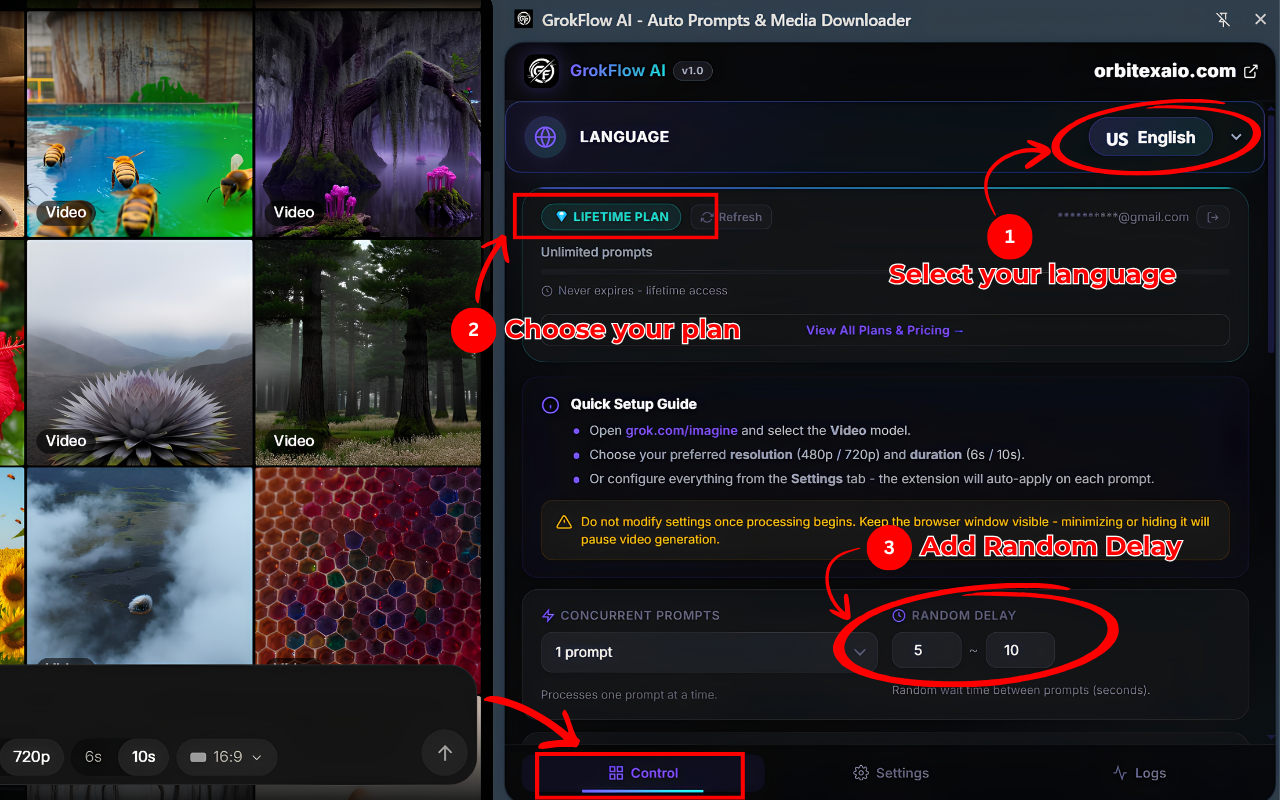
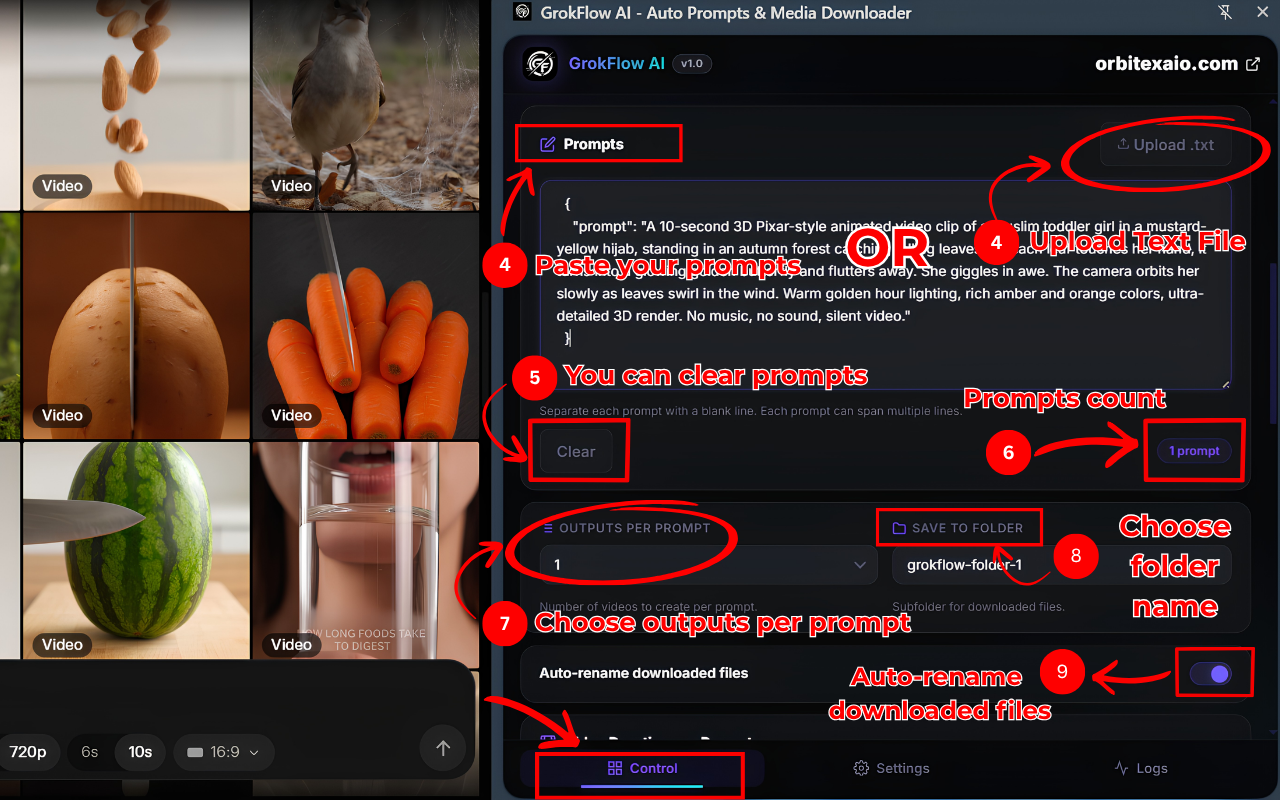
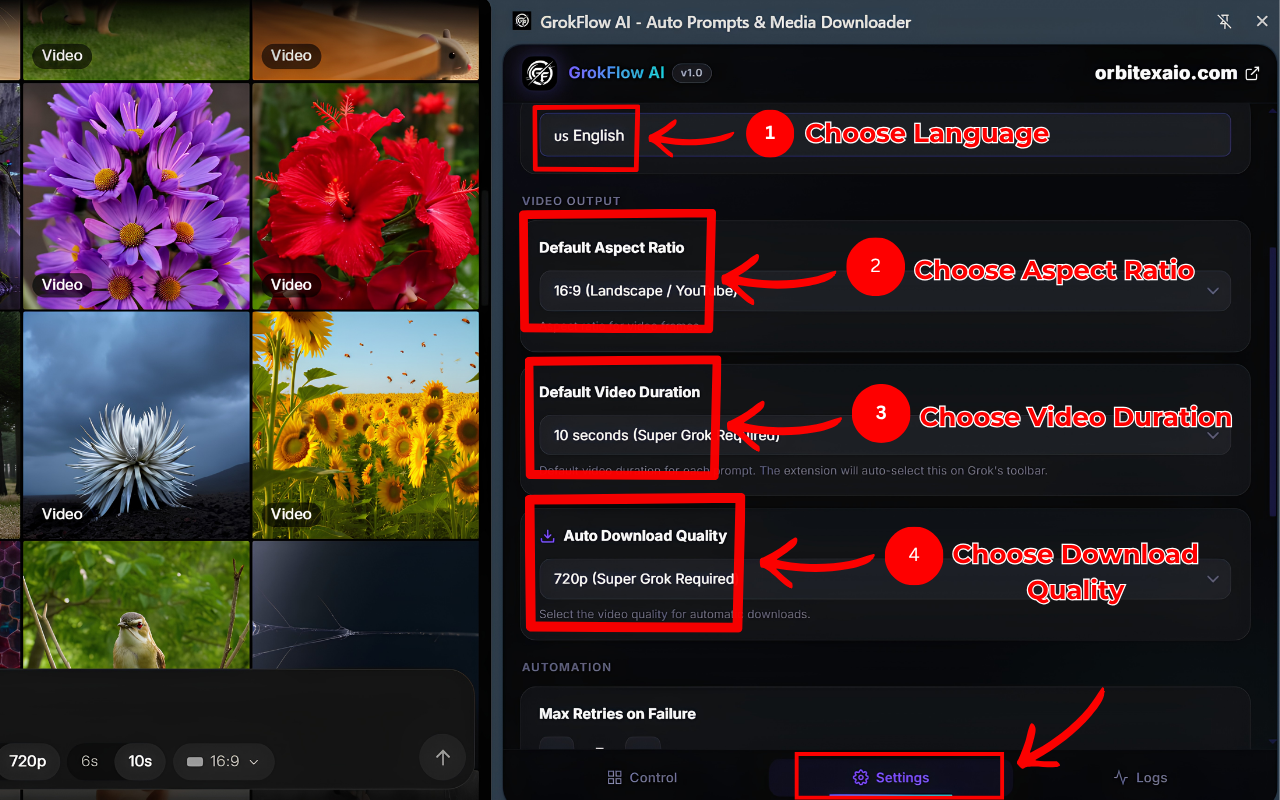
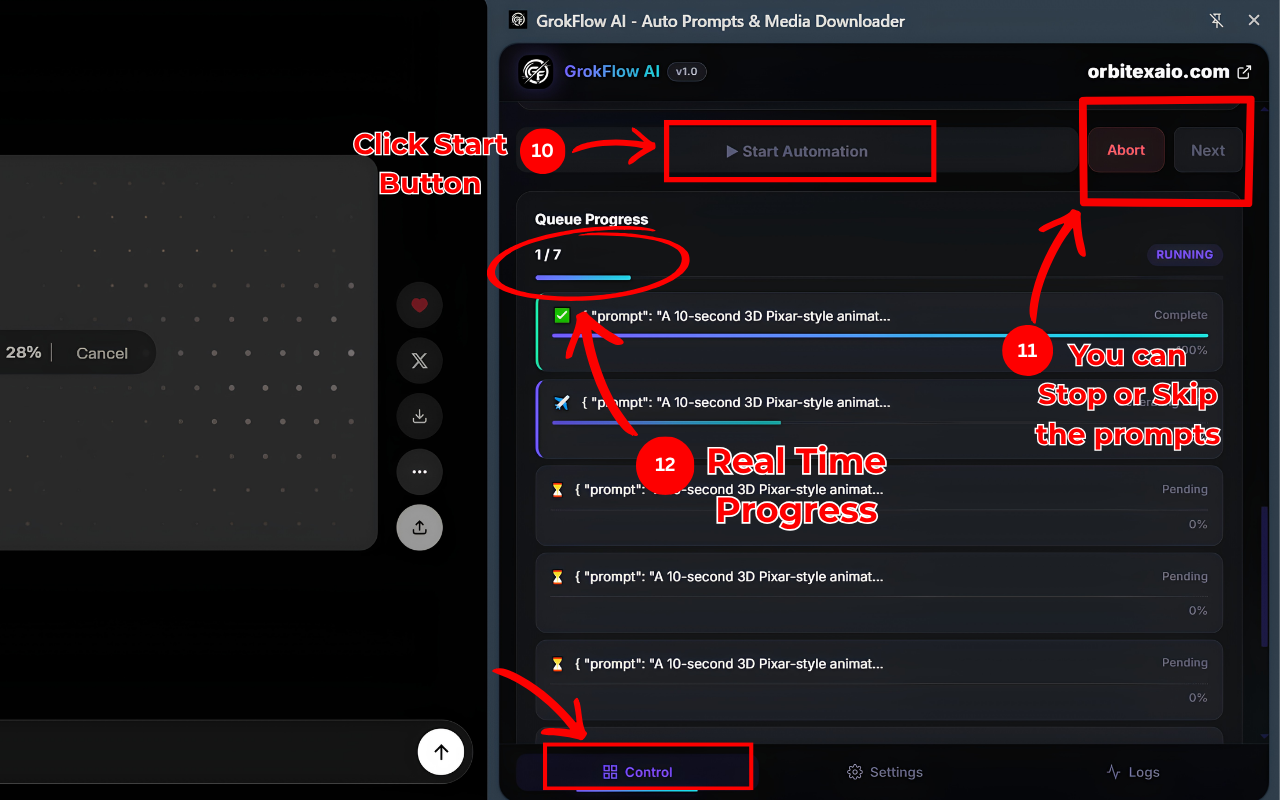
Real screenshots from the Grok Automation extension - the side panel, prompt queue, settings, and automation in progress.
Powerful Features
Everything you need to automate your Grok AI video workflow.
Bulk Video Generation
Queue up to 50+ prompts and generate AI videos on Grok with a single click. No more copy-pasting one prompt at a time.
Auto-Download Videos
Every generated video is automatically saved to your computer. Choose your preferred quality - 480p or 720p.
Smart Queue System
Real-time progress tracking, error handling, auto-retries, and the ability to stop or skip any prompt mid-process.
Customizable Settings
Set default aspect ratio (16:9, 9:16, 1:1), video duration (6s or 10s), download quality, and random delays between prompts.
12 Languages Supported
Full UI translated into 12 languages including English, Spanish, French, German, Arabic, Hindi, Chinese, Korean, Russian, Bengali, Thai, and more.
Organized Downloads
Auto-rename downloaded files and save to custom folders. Keep your AI-generated content organized effortlessly.
Upload .txt Prompts
Import prompts from a text file instead of typing them manually. Perfect for batch workflows with pre-written prompt lists.
Privacy First
No data collection, no tracking, no analytics. Your prompts stay on your device. Only accesses grok.com.
How to Use Grok Automation
Get started in 60 seconds. Here's a step-by-step guide to generating bulk AI videos on Grok.
Install Grok Automation
Download the extension from the Chrome Web Store. One click, takes 5 seconds.
Open grok.com/imagine
Navigate to Grok AI's video generation page and select the Video model.
Open the Side Panel
Click the Grok Automation icon. The side panel opens with the Control tab ready.
Paste Your Prompts
Type your prompts or upload a .txt file. Separate each prompt with a blank line.
Configure Settings
Choose resolution, aspect ratio, duration, download quality, and output folder.
Click Start - Done!
Hit "Start Automation" and walk away. Grok Automation handles everything automatically.
Manual vs Grok Automation
See how much time you save with automated bulk video generation.
| Task | Manual | Grok Automation |
|---|---|---|
| Generate 10 videos | 45-60 minutes | ~5 minutes (hands-free) |
| Generate 50 videos | 4-5 hours | ~25 minutes (hands-free) |
| Download videos | Click download for each | Auto-download every video |
| Switch prompts | Copy → Paste → Wait → Repeat | Queue all → Click Start |
| Organize files | Manual rename + folder | Auto-rename + custom folder |
| Handle errors | Notice → Re-enter prompt | Auto-retry on failure |
Who Uses Grok Automation?
Content Creators
YouTubers and TikTokers who need bulk AI video content at scale.
Social Media Managers
Teams creating daily video posts across multiple accounts.
Digital Artists
Artists exploring AI-generated video for creative projects.
AI Enthusiasts
Anyone who uses Grok AI regularly and wants to save time.
Frequently Asked Questions
Everything you need to know about Grok Automation.
Start Generating Videos Now
Join thousands of content creators who save hours every day with Grok Automation. Free to install, no account required.